In today’s fast-paced digital world, staying organized and productive often feels overwhelming. With endless meetings, projects, and responsibilities, we’re constantly looking for tools that can lighten the load. Enter Notion AI—a smart upgrade to the beloved productivity platform that promises to make our work easier, faster, and smarter.
Source: Notion AI website
What Is Notion AI?
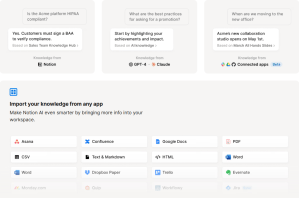
Notion AI enhances the standard Notion workspace by embedding artificial intelligence directly into your daily workflow. For example, a busy marketing manager could use Notion AI to instantly generate meeting notes from a brainstorming session, summarize key points from a 20-page campaign report, and polish an internal email—all within the same workspace. directly into your everyday notes, tasks, and projects. Think of it as having a built-in assistant that can:
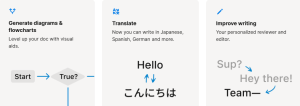
- Generate content: Blog posts, outlines, emails, poems, and even code from a simple prompt.
- Summarize text: Quickly digest long documents or meeting notes.
- Translate: Work smoothly across languages and teams.
- Edit and enhance: Fix grammar, improve tone, or rewrite for clarity.
- Brainstorm: Need new ideas? It can suggest topics, titles, or creative directions.
Whether you’re a student, a marketer, or a startup founder, Notion AI can boost your output with minimal effort.
Source: Notion AI website
Why Notion AI Actually Makes a Difference
It’s one thing to read about a list of features—it’s another to understand how those features translate into real, daily impact. Here’s how Notion AI actively improves the way people work, think, and collaborate:
Save Hours Each Week
Imagine eliminating the constant context-switching between apps, or trimming a two-hour report writing task down to 30 minutes. By automating editing, formatting, and content generation, Notion AI helps you reclaim your time for deeper, more strategic work.
Break Down Language Barriers
Whether you’re working with partners in Brazil or collaborating on a bilingual research project, Notion AI’s real-time translation capabilities ensure your communication stays fluid and inclusive.
Unleash Creative Potential
Facing a blank page is never easy. With just a prompt, Notion AI can generate headlines, outlines, and even full drafts to jumpstart your creative flow, acting as a built-in brainstorming partner.
Simplify Your Tool Stack
Why toggle between half a dozen apps when one will do? Notion AI helps you consolidate your notes, tasks, documents, and AI-powered enhancements into a single, powerful space.
Make Content More Accessible
Need to distill a dense whitepaper into digestible insights? Or translate a product brief for a global audience? Notion AI enables faster comprehension and inclusion with just a few clicks.
1. Enhanced Productivity
No more wasting time on formatting, editing, or writing from scratch. Notion AI helps you focus on what truly matters.
2. Seamless Collaboration
AI-powered translation and team-friendly tools make collaboration faster and easier—especially in global teams.
3. Creativity Boost
Hit with writer’s block? Let AI generate a headline, bullet points, or even a first draft.
4. Workflow Simplification
Replace multiple apps with a single workspace. AI in Notion reduces the need to jump between tools.
5. Accessibility and Inclusion
From translating research to summarizing dense articles, Notion AI helps everyone engage with content more effectively.
Who Should Use It?
Students: Summarize lectures, write essays, and organize class notes. For example, a university student can use Notion AI to quickly draft outlines and condense academic articles before a big exam.
Professionals: Draft reports, manage meeting agendas, and send polished emails. A project manager might use Notion AI to turn bullet points from a team sync into a structured progress update.
Content Creators: Generate ideas, edit copy, and write consistently. Bloggers or social media strategists can use it to brainstorm new content topics or polish up captions.
Entrepreneurs: Build marketing campaigns, brainstorm strategies, and delegate tasks clearly. A startup founder could draft a pitch deck outline or create SOPs (standard operating procedures) for new hires with ease.
Researchers: Translate and summarize complex material quickly. For example, a PhD candidate could use Notion AI to distill key takeaways from 50-page papers and translate foreign-language sources into English.
Getting Started with Notion AI
Using Notion AI is easy. Visit notion.so/product/ai to explore their plans. Once activated, the AI tools become available in any Notion page—just use the spacebar to summon suggestions or ask for summaries.
How Notion AI Compares to Other Tools
While Notion AI offers a powerful and integrated experience, it’s worth considering how it stacks up against other leading tools like Microsoft Copilot, Google Workspace AI, and ChatGPT integrations.
Microsoft Copilot: Built directly into apps like Word, Excel, and Teams, Copilot focuses on enhancing traditional document workflows and productivity tasks. It’s a great fit for enterprises already using Microsoft 365, but it lacks Notion’s seamless blend of content generation, note-taking, and workspace flexibility.
Google Workspace AI: Google’s AI tools are strong in summarization and collaboration within Gmail, Docs, and Meet. However, they’re less customizable and modular than Notion’s workspace setup, which excels in project management and personal knowledge bases.
ChatGPT Plugins & Integrations: While ChatGPT offers powerful standalone capabilities and third-party integrations, it requires more effort to integrate into a cohesive workspace. Notion AI, by contrast, is natively embedded and designed for multi-functionality without extra configuration.
Bottom Line: If you’re already using Notion, its AI tools are a natural, time-saving upgrade. If your workflow lives in Microsoft Office or Google Docs, Copilot or Google AI may feel more familiar. However, for an all-in-one productivity system with AI built directly into your docs, tasks, and team spaces, Notion AI stands out.
The Future of Work with Notion AI
Notion AI doesn’t aim to replace human creativity—it aims to support and amplify it. As digital workloads increase, tools like this will become essential in helping us stay sharp, save time, and do better work.
If you’re already using Notion, trying the AI feature could be a game changer. And if you’re not, now might be the perfect time to explore how AI can transform your productivity.
Ready to give your workflow a boost? Try Notion AI and see what smarter work feels like.
Disclosure: This article is independently written and not sponsored by Notion. Always review pricing and features directly on the official website.
 Future. Now.
Leave a comment